Piano: Learn & Play Songs
- 4.8
- Rating
- 10.00M
- Installs
- Free
- Price
 Analysis by App-foxy
I approached Piano: Learn & Play Songs as a practical music tool rather than expecting it to replace a real keyboard. It is a free Android music and audio app from Firehawk, built around the simple idea of putting piano keys on a phone or tablet. That sounds straightforward, but the experience depends heavily on your screen size, touch accuracy, audio settings, and expectations about learning.
My first impression was that it is easiest to enjoy when I treat it as an always-available practice surface. I can open it for a few minutes, find notes, try a melody, or use it as a casual way to explore piano playing without owning an instrument. It is less convincing if I expect the same response, range, or expressive control I would get from a full acoustic piano or a dedicated digital keyboard.
Where the experience usually gets stuck
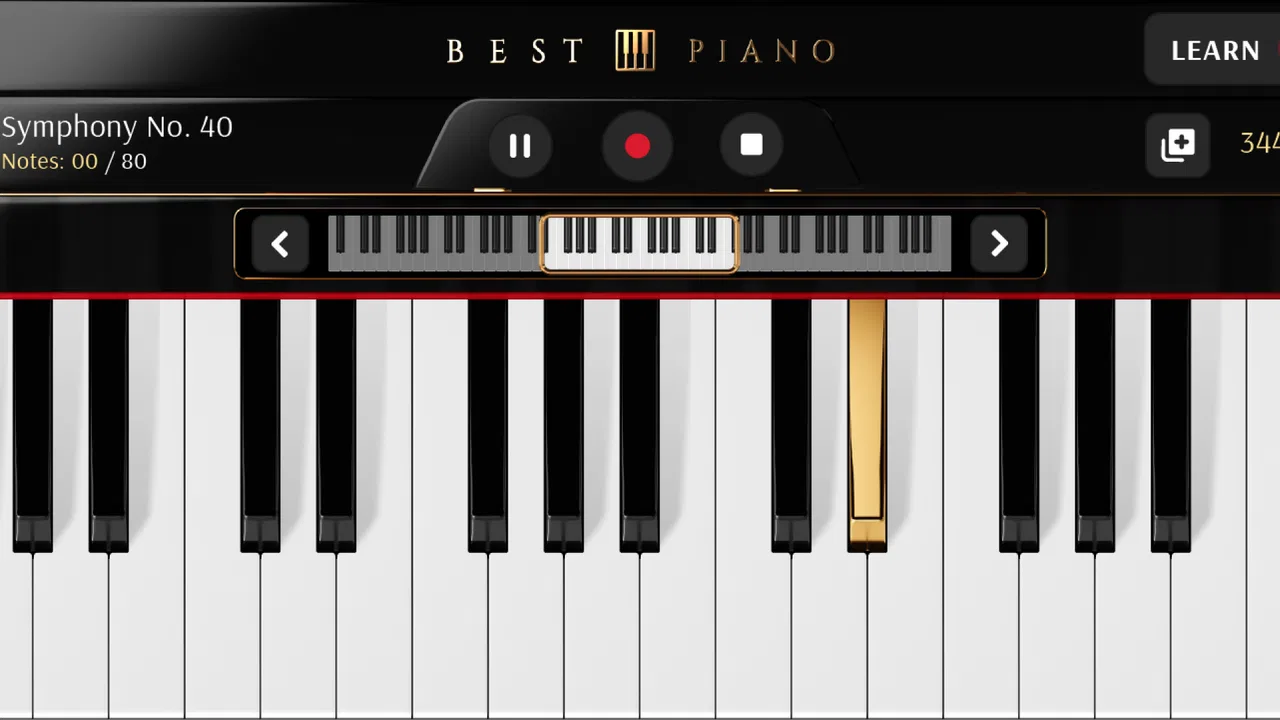
The biggest obstacle is not understanding what a piano app is supposed to do. The obstacle is making touch input feel comfortable. On a phone, the keys occupy a limited area, and my fingers can easily cover neighboring notes. That matters when I try to play quickly or use both hands. A tablet gives the interface more breathing room, so the same app can feel much more usable on a larger display.
You May Also Like

 Blood Strike: 2.5 Anniversary
Blood Strike’s Loadouts Turn Every Drop Into a Tactical Gamble
A close look at Blood Strike’s custom loadouts: how fast access to signature weapons reshapes its battle royale rhythm, rewards preparation, and narrows the gap between fights.

 Pandora - Music & Podcasts
Pandora’s Music Is Easy to Start, but Harder to Recover
Pandora’s strength is its low-effort path from a seed to a station. Its weak spot is how much confidence it asks you to place in connection, setup, and quiet recovery.

 8 Ball Pool
 Is Built on Rivalries, Rematches, and Routine
A close look at the rivalries, rematches, shared routines, and unanswered safety questions that turn a quick pool match into a persistent mobile community.

 Samsung Music
’s Quiet Strength Is Playing What You Already Own
Its reach comes less from spectacle than from dependable access to a personal library. That simplicity is both the app’s strongest retention engine and its ceiling.

 AccuWeather: Weather Radar
AccuWeather Review: A Quick, Clear Forecast for Everyday Decisions
For everyday plans, the best forecast is the one you can understand quickly. AccuWeather makes rain timing, radar, and local conditions easy to act on, with a few trade-offs.

 Hill Climb Racing
Why Hill Climb Racing Still Turns Crashes Into One More Run
A tiny car, a bumpy hill and one more upgrade: Hill Climb Racing keeps resurfacing because its simple chaos makes every near-miss feel personal.
More From Our News Desk



There is also a difference between tapping notes and actually learning to play. A virtual keyboard can help me identify pitches and repeat a short pattern, but it does not automatically teach posture, finger independence, timing discipline, or the physical habits that develop on a real instrument. I found it most useful as a starting point and a practice aid, not as a complete piano course.
That distinction is important before downloading it. Someone who wants a quick musical toy, a portable keyboard, or a low-pressure way to test whether piano interests them will probably understand its appeal. Someone looking for structured lessons, advanced notation, serious recording tools, or highly detailed sound control may feel limited.
Why screen size changes the result
On a small phone, I would use one hand and short musical phrases. Trying to stretch across many keys makes accidental touches more likely, especially if I am holding the device rather than placing it on a stable surface. A larger screen is better for two-handed experiments, although even then it should not be confused with the width and spacing of a physical keyboard.
My practical advice is to rotate the device if the interface allows a more comfortable layout, keep the volume at a moderate level, and avoid judging the app during a rushed first minute. The experience improves when the device is supported instead of balanced in one hand. That small change reduces slips and lets me concentrate on rhythm rather than grip.
What beginners should expect from the sound
The app is designed to make piano playing accessible, but a phone speaker has obvious limits. The sound can seem thin compared with headphones, while headphones can make tapping noise more noticeable. I prefer testing both listening options before deciding whether the tone suits me. If the sound feels delayed, I first check the device and audio setup instead of assuming the app itself is broken.
Touch instruments also have a different kind of response from acoustic instruments. Pressing harder on glass does not create the same natural change in tone as pressing a real piano key with different force. That makes the app suitable for note practice and casual playing, but less suitable for developing a refined sense of dynamics.
Setup checks that save time
Because the app is free to download, the initial decision is easy, but a smooth start still depends on a few basic checks. It runs on Android versions from 6.0 onward, and the current release is 3.0.2. I would check the device software before troubleshooting anything else, especially on an older phone that has not been updated regularly.
I also make sure the device has enough free space for normal app operation, close demanding background apps, and restart the phone if audio behaves strangely. These are ordinary steps, but music apps are particularly sensitive to competing audio activity. A video, call, game, or another sound-producing app can make testing confusing.
When I first open a piano app, I check three things in order: whether the keys respond, whether I can hear the notes, and whether the response feels immediate enough for simple playing. Testing those separately is more useful than changing several settings at once. If the keys react but there is no sound, the problem is probably different from a screen that does not register touches.
Checking audio before blaming the keyboard
I start with the device’s media volume rather than the ringtone volume. I also check whether silent mode, a connected Bluetooth device, or wired headphones are redirecting sound somewhere unexpected. If I am using wireless audio, I compare it with the built-in speaker because Bluetooth can introduce enough delay to make a piano feel unresponsive.
For a quick test, I play a slow sequence of separate notes. This helps me distinguish a genuine response problem from the natural difficulty of playing fast on a small screen. If slow taps sound correctly but rapid passages feel late, the limitation may be the audio path or the device rather than the keyboard interface itself.
Making the first practice session useful
I get more from the app when I choose a narrow goal. Instead of trying to perform a complete song immediately, I might spend five minutes locating a handful of notes, repeating a short melody, or matching notes by ear. This keeps the session manageable and makes it easier to notice whether the app is helping me improve.
A useful routine is to begin slowly, repeat the same phrase several times, then pause before increasing speed. On a touch keyboard, accuracy matters more than ambitious reach. I also keep one finger assigned to each nearby note when possible, because constantly sliding one finger across the screen teaches less control than deliberate placement.
The app’s Everyone age rating makes it approachable for family use, but younger users may still need help with volume, device handling, and realistic expectations. I would place a tablet on a table rather than hand a child a phone while walking around. That makes the activity safer and gives the player a steadier surface for learning.
Recovering a session when something goes wrong
If the app stops responding, I first leave the current screen and reopen it. If that does not help, I force-close it through the device’s normal app controls and launch it again. I avoid immediately changing unrelated phone settings because that can make it harder to identify what actually fixed the issue.
When sound disappears, I repeat the audio checks rather than reinstalling straight away. I test the media volume, disconnect external audio temporarily, and try a simple note. If another app is playing sound, I close it and test again. These steps cover the most common sources of confusion without requiring risky changes.
If touches are being missed, I clean the screen, remove anything that interferes with contact, and try playing with the device resting flat. I also slow down. A missed note caused by two fingers landing too close together can look like a software fault, especially when I am trying to play a fast phrase on a phone.
When starting over makes sense
Reinstalling should be a later step, not the first response. I would consider it if basic restarting and audio checks do not improve the behavior, particularly after an operating-system update or an interrupted installation. Before doing that, I make sure I understand what might be reset locally, because reinstalling an app can remove local preferences or progress.
Since optional purchases range from $0.99 to $99.99 per item, I would also be careful not to treat reinstalling as a casual experiment if I have already bought anything. I keep purchase records available and use the same store account when restoring eligible purchases. That is sensible practice for any app with optional in-app transactions.
The free entry point is one of the app’s strongest practical advantages. I can test the keyboard, judge the sound, and see whether the touch layout suits me before spending anything. At the same time, I would not assume that every potentially useful part of the experience is included at no cost. I check each purchase screen carefully and avoid tapping through quickly.
When the app is not the cause
Some frustrations come from the device itself. An older phone may struggle with audio responsiveness when many processes are running. A damaged or poorly calibrated touchscreen can produce missed taps. A crowded notification panel, aggressive battery management, or an active call can also interrupt a short practice session.
To isolate the cause, I use a simple comparison. I try the app after restarting the device, with other audio apps closed, and with the phone connected to no external speaker or headphones. If the behavior changes under those conditions, the environment is part of the problem. If it remains exactly the same, I then look more closely at the app or device compatibility.
Internet conditions are another source of mistaken assumptions. A piano keyboard should feel like a local touch activity, but any surrounding content or store process may behave differently when connectivity is poor. I do not repeatedly tap buttons if a screen appears slow; I wait, check the connection, and reopen the relevant screen if necessary. That avoids duplicate actions and accidental purchases.
Comparing it with the usual alternatives
Compared with a physical keyboard, this app wins on portability and cost. I can carry it on a phone and use it without finding space for an instrument. The trade-off is clear: the glass surface has no real key travel, limited tactile feedback, and less room for comfortable two-handed playing.
Compared with a dedicated piano-learning service, it is more immediate and less demanding. I can open it and play without committing to a long lesson format. A structured learning platform is usually the better choice if I need guided progression, exercises that build in difficulty, reading practice, or regular feedback.
Compared with a simple browser-based piano, a dedicated installed app is more convenient for repeated use because I do not need to find the same page each time. However, convenience does not automatically mean deeper instruction. I would choose this app for quick access and casual practice, then look elsewhere if my goal became formal study.
Compared with a music-production workstation, it is much less complicated. That is an advantage for a beginner who only wants piano keys, but a disadvantage for someone who needs layered instruments, detailed editing, or a broader arrangement workflow. The right choice depends on whether the piano itself is the destination or merely one part of a larger project.
Who will get the most from it
I think it suits curious beginners, occasional players, parents looking for a simple music activity, and anyone who wants to experiment with melodies away from home. It is also useful for recalling a note sequence when a real keyboard is unavailable. The low barrier matters: I do not need to buy hardware before finding out whether I enjoy pressing keys and repeating patterns.
A realistic everyday use case is a short evening practice session. I can place a tablet on the kitchen table, lower the volume, and spend a few minutes repeating a melody I heard earlier. I do not need a full room, a stand, or a scheduled lesson. If I keep the goal small, the app turns spare time into useful musical repetition.
Another good use is checking an idea before forgetting it. If a tune comes to me while traveling, I can use the virtual keys to find its shape and remember the relationship between notes. I would not expect the app to produce a polished recording, but it can help preserve a musical thought long enough to develop later on a proper instrument.
I would skip it if I already own a good digital piano and care about realistic key resistance, pedal technique, or expressive dynamics. I would also choose another tool if I need a complete curriculum or if tiny touch targets frustrate me. The app cannot solve the physical limitations of a phone, and no amount of enthusiasm changes that.
My practical verdict after using it
Firehawk’s piano app succeeds because it makes the first step easy. It is free, broadly accessible, and focused enough that I can begin playing without learning a complicated production interface. Its 4.5 average from around 31 thousand ratings and more than 10 million installs suggest that many people find this straightforward approach worthwhile, although popularity does not remove the limitations of touch controls.
The most important decision is choosing the right device and use case. On a larger screen, with stable support and simple audio, the experience is more comfortable. On a small phone, I keep sessions short and play slowly. If I remember that it is a portable virtual piano rather than a replacement for a physical instrument or a full course, I am much more likely to enjoy it.
The app has been available since March 27, 2013, and its current version is 3.0.2. That long presence makes it feel like a familiar option in the category, but I still judge it by the immediate experience: responsive enough for basic practice, easy to test, and limited when technique becomes demanding.
My recommendation is simple: try it if you want an accessible way to explore piano, repeat melodies, or fill short gaps in the day. Start with audio and screen checks, use a stable surface, and test the free experience before considering any optional purchase. It is best as a convenient practice companion, not as a complete substitute for lessons or a real keyboard.
FAQs for Piano: Learn & Play Songs
01What is Piano: Learn & Play Songs?
Piano: Learn & Play Songs is an engaging app designed for both beginners and advanced players who want to learn and play their favorite songs on the piano. It provides a user-friendly interface with lessons, tutorials, and a vast library of songs across various genres to cater to different musical tastes and skill levels.
02Is Piano: Learn & Play Songs suitable for beginners?
Absolutely! Piano: Learn & Play Songs is perfect for beginners. The app offers step-by-step tutorials and interactive lessons that guide users through the basics of piano playing. With features like slow-tempo practice and hands-on guidance, beginners can comfortably learn at their own pace while building confidence.
03What features are included in the app?
The app comes packed with features such as a vast song library, interactive lessons, customizable metronome settings, and recording capabilities. It also includes real-time feedback to help users improve their playing technique and performance. The app's adaptive learning technology personalizes the experience based on the user's progress and skill level.
04Does the app require a subscription?
Yes, while Piano: Learn & Play Songs offers a free version with limited access, a subscription is required to unlock the full library of songs and advanced features. The subscription options often include monthly or yearly plans, providing users with additional content, ad-free experience, and premium support.
05Can I use Piano: Learn & Play Songs on multiple devices?
Yes, the app supports multiple devices, allowing users to sync their progress and continue learning seamlessly across smartphones and tablets. Users need to log in with the same account on each device to ensure their progress and preferences are saved and accessible on all platforms.
Pros
- Intuitive interface for easy navigation.
- Wide range of songs for all skill levels.
- Real-time feedback improves learning.
- Offline mode available for practice.
- Customizable lessons and exercises.
Cons
- Limited free content available.
- Requires internet for some features.
- Ads can be intrusive at times.
- High-quality headphones recommended.
- Subscription can be pricey for some.

Piano: Learn & Play Songs
Gallery